Network and connectivity
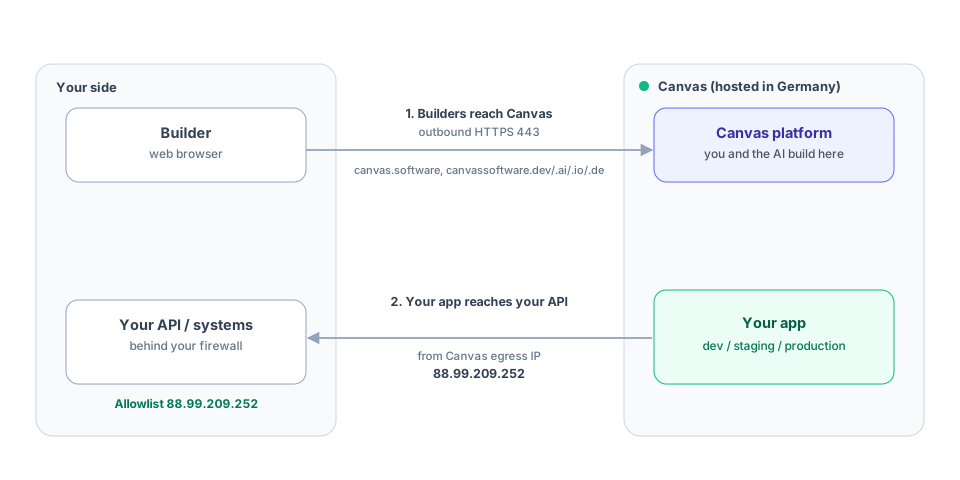
Canvas runs in the cloud and in the browser. For your IT team there are only two connectivity questions: how your builders reach Canvas, and, if you want it, how an app you build on Canvas reaches your own systems. The basic case needs nothing installed on anyone’s device and nothing inbound to your network.
What builders need
Section titled “What builders need”Your builders work in the browser, so they need outbound HTTPS (port 443) to Canvas’s domains. Allow these and their subdomains:
canvas.softwarecanvassoftware.devcanvassoftware.aicanvassoftware.iocanvassoftware.de
That is the whole requirement on the device side: a current browser and outbound 443, nothing to install. Live updates use the same connection. No inbound connections to your network are needed.
Where your apps are served
Section titled “Where your apps are served”Apps you build are served by Canvas over HTTPS on Canvas-managed hostnames. You can also use your own domain: open the app’s settings, add the domain, and Canvas shows you the exact DNS records to create. Once they are in place, Canvas issues and renews the TLS certificate automatically, so you never manage certificates yourself.
Development and staging are password-protected, so work in progress stays private. Production is public, or on your own domain.
For how apps run and where data lives, see Architecture.
Connecting your app to your own systems
Section titled “Connecting your app to your own systems”An app often needs to reach an API you already run, for example a database gateway or an internal service behind your firewall. Two things make that work.
1. Let Canvas reach you. Outbound calls from your app leave Canvas from a single, stable egress
address: 88.99.209.252. Allowlist it as ingress on your firewall or API gateway. This is a
different address from the one your apps are served on; it is only the source of calls your app makes.
2. Give the app its credentials. Your app authenticates to your API with the credentials you issue: a bearer or OAuth token, an API key, or a client certificate for mutual TLS. You store these in Canvas as an integration, where the values are write-only, encrypted, and never shown to anyone, including the AI that helps build your app. See Credentials and secrets for how to set one up and control which apps may use it.
There is no Canvas-managed proxy in the path and no Canvas-issued identity on your API. Your app calls your API directly, from the egress IP above, with your credentials.
Enterprise: private connectivity
Section titled “Enterprise: private connectivity”If you would rather not expose an API to the public internet at all, site-to-site VPN or private peering is available as an Enterprise option, set up per engagement. Talk to us about your requirements.
Checklist for IT
Section titled “Checklist for IT”- Allow outbound 443 from builders to
canvas.software,canvassoftware.dev,canvassoftware.ai,canvassoftware.io, andcanvassoftware.de(and subdomains). - If Canvas calls your API: allowlist
88.99.209.252as ingress, and store the credential as an integration. - Optional: use your own domain (add it in the app and follow the DNS records shown; Canvas handles TLS).
- Prefer private connectivity over public ingress? Ask about the Enterprise VPN or peering option.